- Main Exam Dashboard
- Testing Area Features
- Correct Answers with Explanations
- Create/Read Notes
- Review Market
- Test Results
- Settings
Testing Area Features
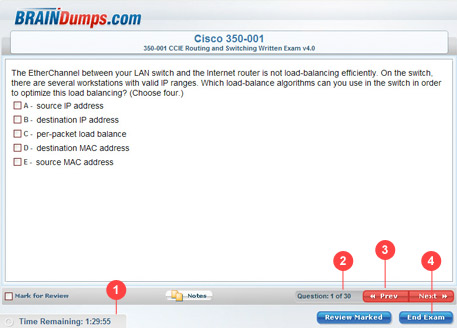
Features:
- Timer/count down – indicates how much time you have left. It starts automatically once you launch your exam.
- Number of questions – indicates the number of questions in this test. Each question has several options. Just tick a box with the correct answer.
- Previous/next button navigation - if you aren't sure about some questions you can return back using 'previous' and 'next' buttons.
- End exam - you can end your exam anytime and then resume it from your main dashboard area.